Loops
What is a Loop?
A loop is a control flow statement that allows us to repeatedly execute a block of code until a specified condition is satisfied.
Loops are mainly used when the same operation needs to be performed multiple times. Instead of writing the same code again and again, we can use a loop to execute the code repeatedly.
Console.WriteLine() 100 times. A loop can perform this task
using only a few lines of code.
Types of Loops in C#
Loops are mainly divided into the following types:
| Loop | Purpose | Best Used When |
|---|---|---|
| for | Repeats code based on a counter | Number of iterations is known |
| while | Repeats code while a condition is true | Number of iterations may not be known |
| do-while | Executes the block at least once | Code must execute at least one time |
| foreach | Iterates through a collection | Working with arrays or collections |
1. For Loop
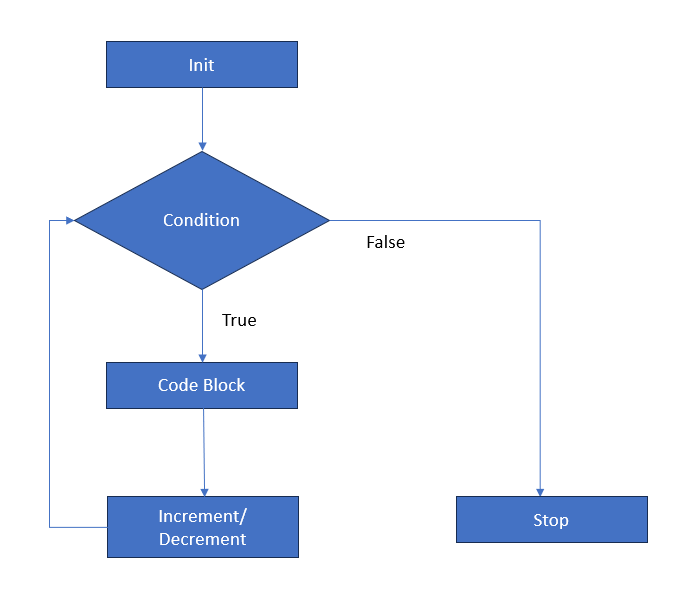
For Loop in C# is a control flow statement that allows us to repeatedly execute a block of code a specified number of times. The For Loop in C# is used when we know the exact number iterations. It contain three stages i.e. initialization, condition and increment or decrement operation.
The three parts of a for loop are:
- Initialization: Runs only once when the loop begins. This is typically where you declare and set your loop counter variable.
- Condition: A Boolean expression evaluated before every iteration. If true, the loop body runs; if false, the loop terminates.
- Iterator: Executes at the end of every loop iteration, usually incrementing or decrementing the counter variable.
Syntax
for (initialization; condition; iterator)
{
    // Code to be executed
}
Example 1: Basic Incrementing Loop (Counting Up)
Write a program to print numbers from 1 to 10.
using System;

for (int i = 1; i <= 10; i++)
{
    Console.WriteLine(i);
}Output: 1 2 3 4 5 6 7 8 9 10
Example 2: Decrementing Loop (Counting Down)
A for loop can also be used to count backwards.
using System;

for (int i = 10; i >= 1; i--)
{
    Console.WriteLine(i);
}Output: 10 9 8 7 6 5 4 3 2 1
Example 3: Printing Even Numbers
We can use a loop with a condition to print only even numbers.
using System;

for (int i = 1; i <= 10; i++)
{
    if (i % 2 == 0)
    {
        Console.WriteLine(i);
    }
}Output: 2 4 6 8 10
2. While Loop
The while loop executes a block of code repeatedly as long as the specified condition evaluates to true.
The condition is checked before every iteration. If the condition is false initially, the loop body will not execute even once.
Syntax
while (condition)
{
    // Code to be executed
}
Example
using System;

int i = 1;

while (i <= 5)
{
    Console.WriteLine(i);
    i++;
}Output: 1 2 3 4 5
3. Do-While Loop
The do-while loop is similar to the while loop, but there is one important difference: the code block executes at least once before the condition is checked.
Syntax
do
{
    // Code to be executed
}
while (condition);
Example
using System;

int i = 1;
do
{
    Console.WriteLine(i);
    i++;
}
while (i <= 5);Output: 1 2 3 4 5
4. Foreach Loop
The foreach loop is used to iterate through each element of an array or collection. It is commonly used when we want to read every item without manually managing an index.
Syntax
foreach (dataType variable in collection)
{
    // Code to be executed
}
Example
using System;

string[] courses =
{
    "C#",
    ".NET",
    "SQL",
    "Azure"
};

foreach (string course in courses)
{
    Console.WriteLine(course);
}The foreach loop automatically moves through every element of the collection one by one.
5. Nested Loops
A loop inside another loop is called a nested loop. The inner loop completes all of its iterations for every iteration of the outer loop.
Example: Pattern Printing
using System;

for (int i = 1; i <= 3; i++)
{
    for (int j = 1; j <= 3; j++)
    {
        Console.Write("* ");
    }

    Console.WriteLine();
}Output:
* * *
* * *
* * *
6. Break Statement
The break statement is used to immediately terminate
a loop. When the break statement is executed, control moves outside
the loop.
Example
using System;

for (int i = 1; i <= 10; i++)
{
    if (i == 5)
    {
        break;
    }

    Console.WriteLine(i);
}Output: 1 2 3 4
7. Continue Statement
The continue statement skips the current iteration
of the loop and moves to the next iteration.
Example
using System;

for (int i = 1; i <= 5; i++)
{
    if (i == 3)
    {
        continue;
    }

    Console.WriteLine(i);
}Output: 1 2 4 5
For vs While vs Do-While vs Foreach
| Feature | for | while | do-while | foreach |
|---|---|---|---|---|
| Condition Checked | Before iteration | Before iteration | After iteration | Automatically |
| Minimum Execution | Zero times | Zero times | At least once | Depends on collection |
| Best For | Known iterations | Unknown iterations | Menu/input scenarios | Collections |
Real-World Example
Loops are widely used in real-world applications such as processing student records, displaying product lists, reading database records, generating reports, processing orders, and validating user input.
using System;

string[] students =
{
    "Rahul",
    "Priya",
    "Amit",
    "Sneha"
};

foreach (string student in students)
{
    Console.WriteLine($"Student: {student}");
}
Here, the foreach loop processes each student name
one by one. Similar logic can be used to process records received
from a database or API.
Common Mistakes to Avoid
- Always make sure the loop condition can eventually become false.
-
Be careful with
i++andi--to avoid unexpected results. - Avoid accidentally creating an infinite loop.
-
Use
breakwhen you need to terminate a loop early. -
Use
continuewhen you want to skip only the current iteration. -
Use
foreachwhen you simply need to process every item in a collection.
Summary
Loops are used to repeatedly execute a block of code.
C# provides different types of loops such as
for, while, do-while,
and foreach. The for loop is useful
when the number of iterations is known, while
while and do-while are useful when
execution depends on a condition. The foreach
loop is commonly used with arrays and collections.
Nested loops can be used for patterns and multi-dimensional
data, while break and continue
provide additional control over loop execution.
Practice Questions
- Write a program to print numbers from 1 to 100 using a for loop.
- Write a program to print numbers from 100 to 1 using a for loop.
- Write a program to print all even numbers between 1 and 50.
- Write a program to calculate the sum of numbers from 1 to 100.
- Write a program to print the multiplication table of a number.
- Write a program using while loop to print numbers from 1 to 10.
- Write a program using do-while loop for a simple menu.
- Create an array of five student names and display them using foreach.
- Create a nested loop to print a star pattern.
- Write a program using break and continue statements.