Type Conversion
Type Conversion / Casting in C#
C# supports four primary categories of type conversion. Type conversion is the process of converting a value from one data type to another data type.
Implicit Conversions (Automatic)
Implicit conversion happens automatically when you convert a smaller data type into a larger data type, or a derived class into a base class. This process is type-safe, and normally no data is lost during the operation.
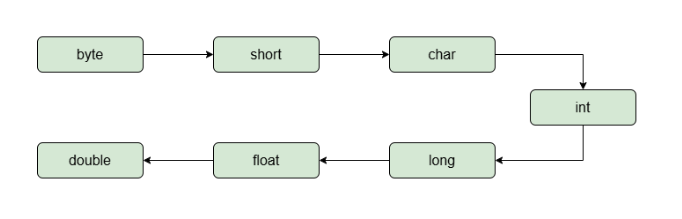
Example
using System;

int x = 10;
double d = x;     // implicit conversion

Console.WriteLine(d);
Here, the int value is automatically converted
into a double value.
Explicit Type Casting
Explicit conversion is a manual step required when converting a larger data type to a smaller data type (narrowing), or when a specific cast is required. This is done using a cast operator (the target type in parentheses). This conversion may result in data loss or truncation.
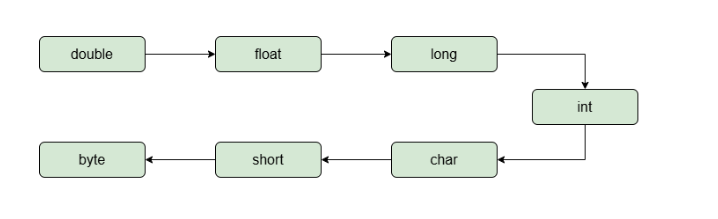
Example
using System;

double d = 9.8;

// explicit casting
int x = (int)d;

Console.WriteLine(x);The output will be 9 because the decimal part is removed during explicit casting.
Invalid Implicit Conversion
int a = 10;
double d = 5.8;

// Error
a = d;

// Error: Cannot implicitly convert double to int.
A double value cannot be automatically assigned
to an int because the conversion may cause data loss.
Parsing (String to Numeric)
When dealing with incompatible types, such as converting a string to a number, direct casting will not work. Instead, you must use parsing methods.
- .Parse(): Throws a runtime exception if the string cannot be successfully converted.
- .TryParse(): Safely attempts the conversion, returning a boolean indicating success or failure without crashing the program.
Example
using System;

string textAge = "25";

// Using Parse
int age1 = int.Parse(textAge);

// Using TryParse
bool success = int.TryParse(textAge, out int age2);

Console.WriteLine(age1);
Console.WriteLine(age2);
Console.WriteLine(success);Conversion Classes
The built-in System.Convert utility class provides
a broad set of static methods to convert between basic data
types. It is useful when converting values such as strings,
numbers, and other compatible types.
using System;

string textValue = "456";

int number = Convert.ToInt32(textValue);

double exactPrice = 19.99;
int roundedPrice = Convert.ToInt32(exactPrice);

Console.WriteLine(number);
Console.WriteLine(roundedPrice);
Convert.ToInt32() converts the value into a
32-bit integer. For 19.99, the result is
20.
Direct Comparison: Parse vs TryParse vs Convert
| Feature | int.Parse(str) | int.TryParse(str, out val) | Convert.ToInt32(obj) |
|---|---|---|---|
| Input Type | String only | String only | Supports multiple compatible types |
| If Input is null | Throws ArgumentNullException | Returns false | Returns 0 for a null reference |
| Best Used For | Guaranteed valid strings | User inputs / unpredictable strings | General type conversion |
Safe Reference Type Conversions (as and is)
When dealing with objects and inheritance, C# provides
is and as keywords for safe
reference type conversions.
- is keyword: Checks if an object is compatible with a given type and returns a boolean result.
-
as keyword:
Attempts a conversion and returns
nullif the conversion is not possible.
Example
using System;

object greeting = "Hello World";

// Using 'is'
if (greeting is string text)
{
    Console.WriteLine(text.Length);
}

// Using 'as'
string text2 = greeting as string;Summary
- Implicit conversion happens automatically.
- Explicit casting is performed manually.
-
Parse()converts valid strings into numeric values. -
TryParse()safely handles invalid user input. -
Convertprovides convenient conversion methods. -
ischecks type compatibility. -
assafely attempts reference conversion.